Design.prm
Define settings used by Design by adding the Design.prm file to their /User/Overrides folders ($O).
Data File Filter
Syntax
-DataFileFilter=File Type Description to Display|Filter(s) with wildcard
Example
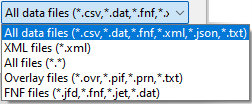
-DataFileFilter=Overlay files (*.ovr,*.pif,*.prn,*.txt)|*.ovr;*.pif;*.prn;*.txt|FNF files (*.jfd,*.fnf,*.jet,*.dat)|*.jfd;*.fnf;*.jet;*.dat|
Description
Often, users have custom file extensions for their data. When developing, the extra step of selecting the All Files (*.*) filter or manually entering the wildcard and data file extension, such as (*.JET), can become taxing. Applying the DataFileFilter option adds a custom filter to the data drop-down list in Design. The result of the example is shown below.
Form Explorer Font Size
Syntax
-FEPointSize=point size
Example
-FEPointSize 12
The default is 8 points.
Description
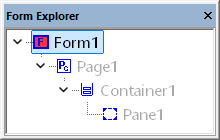
Change the point size of the Form Explorer. This is useful if you have trouble reading the objects or clicking on the expand and collapse arrows.
LabelToFieldRetainText
Allows users to enable or disable preserving the label text as the initial field value during the label-to-field conversion. The initial field value is empty by default.
Syntax
-LabelToFieldRetainText=Y/N
Description
In Design, by default, when converting a text label to a field object using the menu option Format > Convert Label, the text label content is cleared.
However, if you prefer to retain the text label content in the Initial Value of the field, add the command line option to your Design.prm file in your $U/Overrides folder.
As a result, the Initial Value is used as the field's default value. This can be useful when creating realistic sample data for automatically generated forms.
Important
Be sure to remove all Initial Values before promoting the template to your production environment, since the sample value is used whenever the corresponding field value is missing from the input data.
For example, if you are developing a new document using a sample PDF that was processed through Eclipse Form Conversion Service, the raw converted XATW will contain all content from the PDF, including captions and data values as text labels.
Assume you have the following Sold To address in the sample PDF:
Sample Company
100 Any Avenue
Suite 100
Chicago, Illinois 60611
And you convert each line into fields mapped as follows:
CompanyName
Address1
Address2
Address3
If you later merge data that does not contain Address2, the generated document will still display:
Suite 100
because the Initial Value remains in the field.